Images Settings
Prestashop can accept images of (almost) any size. It automatically reformats the images you upload and saves them according to it’s default image size. Prestashop also resizes the images to generate smaller thumbnails. So the best image size is the largest size that Prestashop uses (for zoomed up images), then the smaller images will be taken care of later.
Understanding Image Aspect Ratios
The aspect ratio determines the proportional relationship between an image's width and height. For example:
- 10:13 (Alysum default) = Portrait orientation, taller than wide
- 1:1 (Square) = Equal width and height, popular for Instagram-style layouts
- 4:3 = Slightly wider, classic photography ratio
- 3:4 = Portrait orientation, common for fashion products
Avoid White Gaps: Match Your Proportions
The fix: Always upload images that exactly match your configured aspect ratio. If your theme is set to 1:1, upload square images. If set to 10:13, upload portrait images with that exact ratio.
How to Change Image Proportions
- Navigate to Design → Image Settings
- Click the edit button of an image type you want to change
- Set updated width/height values to match your desired ratio
- Save changes
- Regenerate existing images (scroll to bottom of Image Settings page)
- Select the image types to regenerate
- Check "Erase previous images"
- Click "Regenerate thumbnails"
Example: Changing from 10:13 to 1:1 (Square)
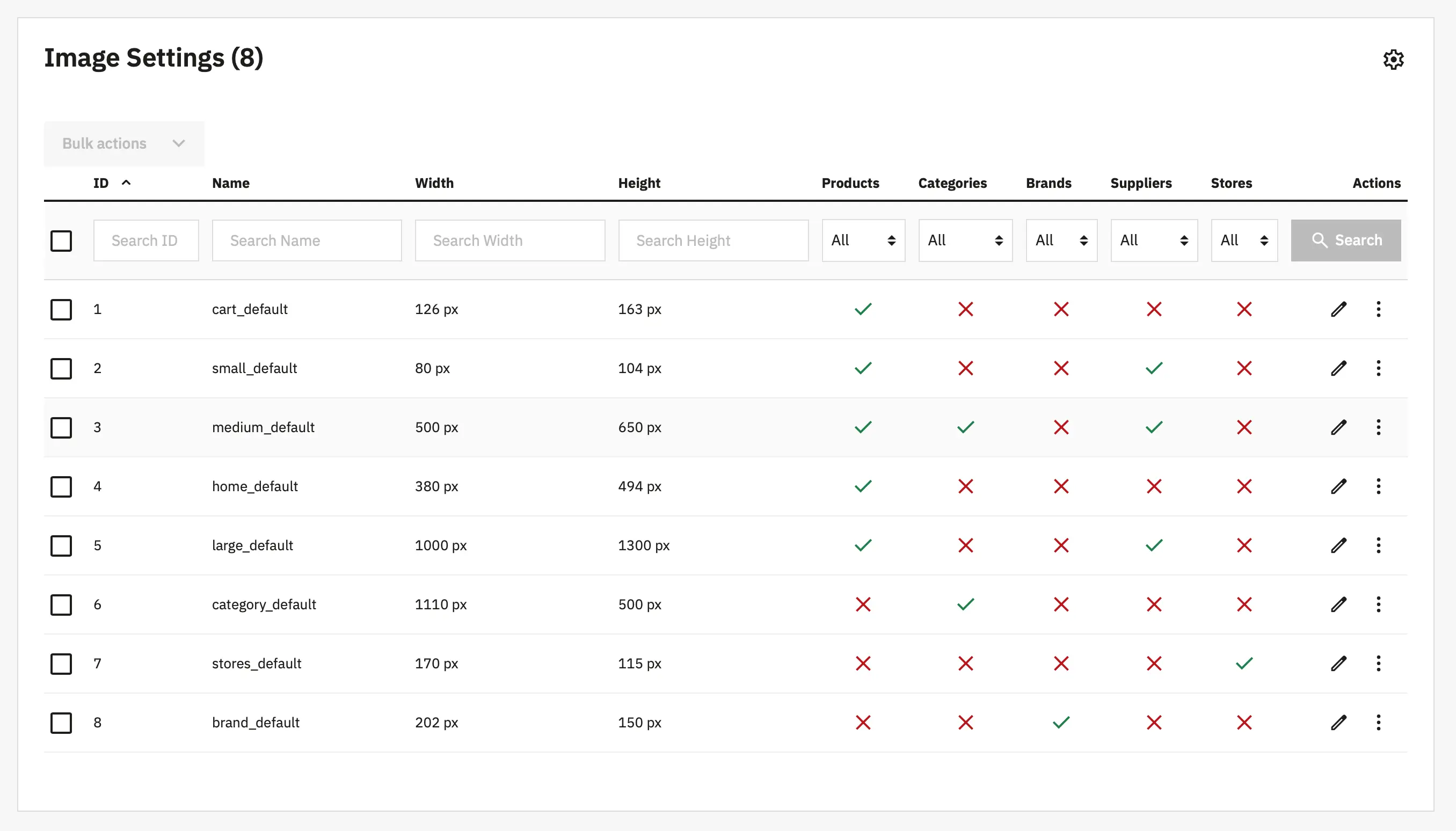
Current Alysum defaults (10:13 ratio):
small_default: 80 × 104
medium_default: 500 × 650
large_default: 1000 × 1300New square dimensions (1:1 ratio):
small_default: 80 × 80
medium_default: 500 × 500
large_default: 1000 × 1000Tips to get nice looking images:
Images Settings- All product images should have the same aspect ratio. Consistency is key. Don't mix square images with rectangular ones.
- Maintain proportion across all image types If you use 1:1 for large_default, use 1:1 for small_default and medium_default too.
- Source images should match your chosen aspect ratio If using 1:1 ratio, upload square images (1000×1000px). PrestaShop will crop incorrectly proportioned images.
- Source images should not be smaller than large_default Upload images at least as large as your largest image type. Recommended minimum: 1000×1000px for 1:1 ratio.
Default Image Sizes Reference
Here's a screenshot of the default Alysum image sizes (10:13 ratio):