

Promokit Popup (pkpopup)
Overview
Promokit Popup displays a modal window on the storefront using a saved Creative Elements (CE) template. It is intended for marketing messages, announcements, or opt-ins and supports simple display rules.
Configuration
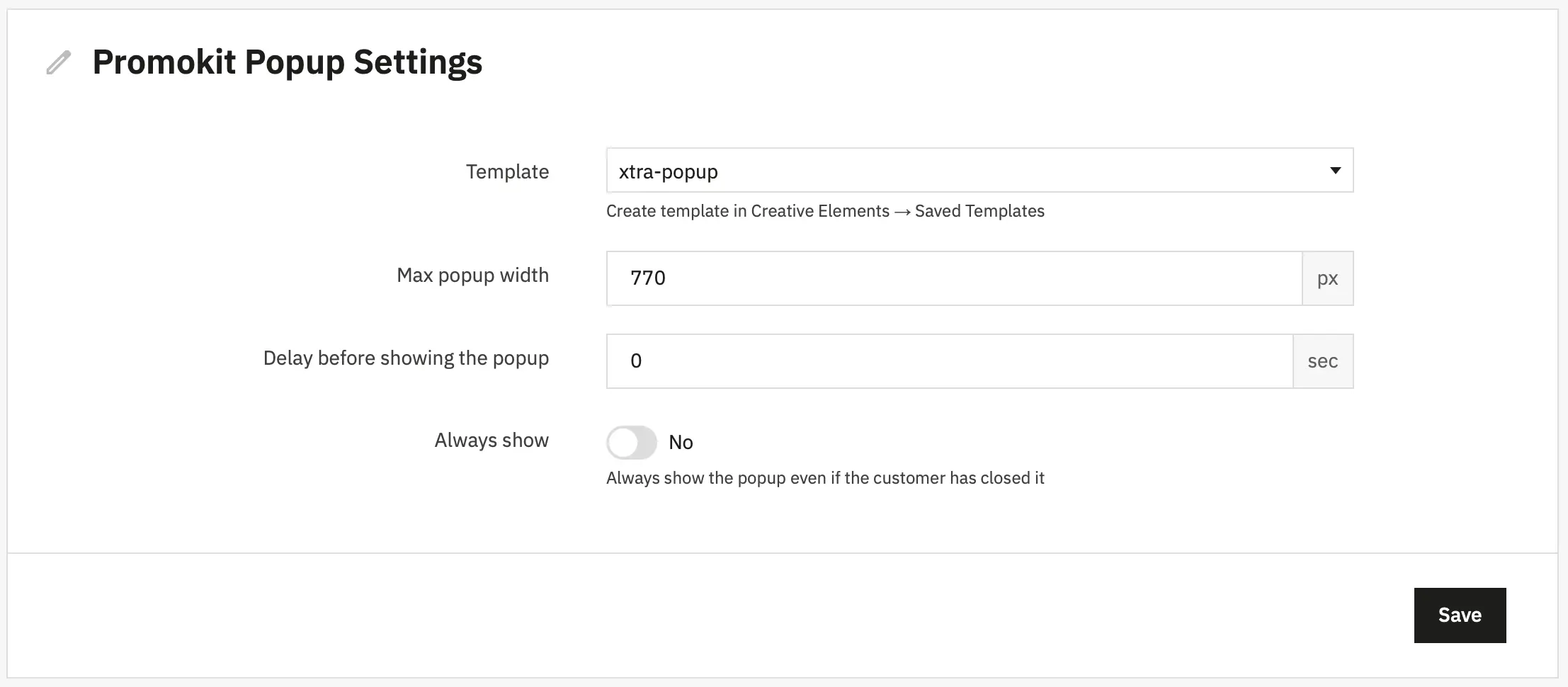
- Template — CE template identifier to render inside the modal.
- Max popup width — Popup width in pixels (default
770). - Delay before showing — Delay in milliseconds before showing the popup.
0uses the "first mousemove" behaviour (exit-intent-like). - Always show — When
truethe popup ignores the cookie and displays on every page load.
Hooks used
displayHeader— Enqueues frontend JS/CSS and exposes thepkpopupJS config (viaMedia::addJsDef). Only enqueued when CE is available and a template is configured.displayBeforeBodyClosingTag— Renders the end-of-page popup container (views/templates/front/endofpage.tpl) and injects the CE content.actionAdminControllerSetMedia— Loads admin media for the CE template chooser when editing module configuration.
Frontend behaviour
- The popup content is a CE template rendered via
Hook::exec('CETemplate', ['id' => $id]). - The JS (
views/js/scripts.js) uses MicroModal to open the popup. It reads thepkpopupJS config injected indisplayHeaderand implements:delay === 0→ show on firstmousemove(exit-intent-like);delay > 0→ show afterdelayms;- on close → set cookie named
pkpopup(unlessalways_showistrue) to prevent repeat displays.
Cookies
- Cookie name:
pkpopup— set when the popup is closed to suppress future shows for the same visitor.