
Promokit Product Tabs (pkproducttabs)
Overview
Promokit Product Tabs lets you add custom, per-shop product tabs with default content and per-product overrides. Tabs can be limited to specific categories or manufacturers and are editable per product in the Back Office.
Configuration
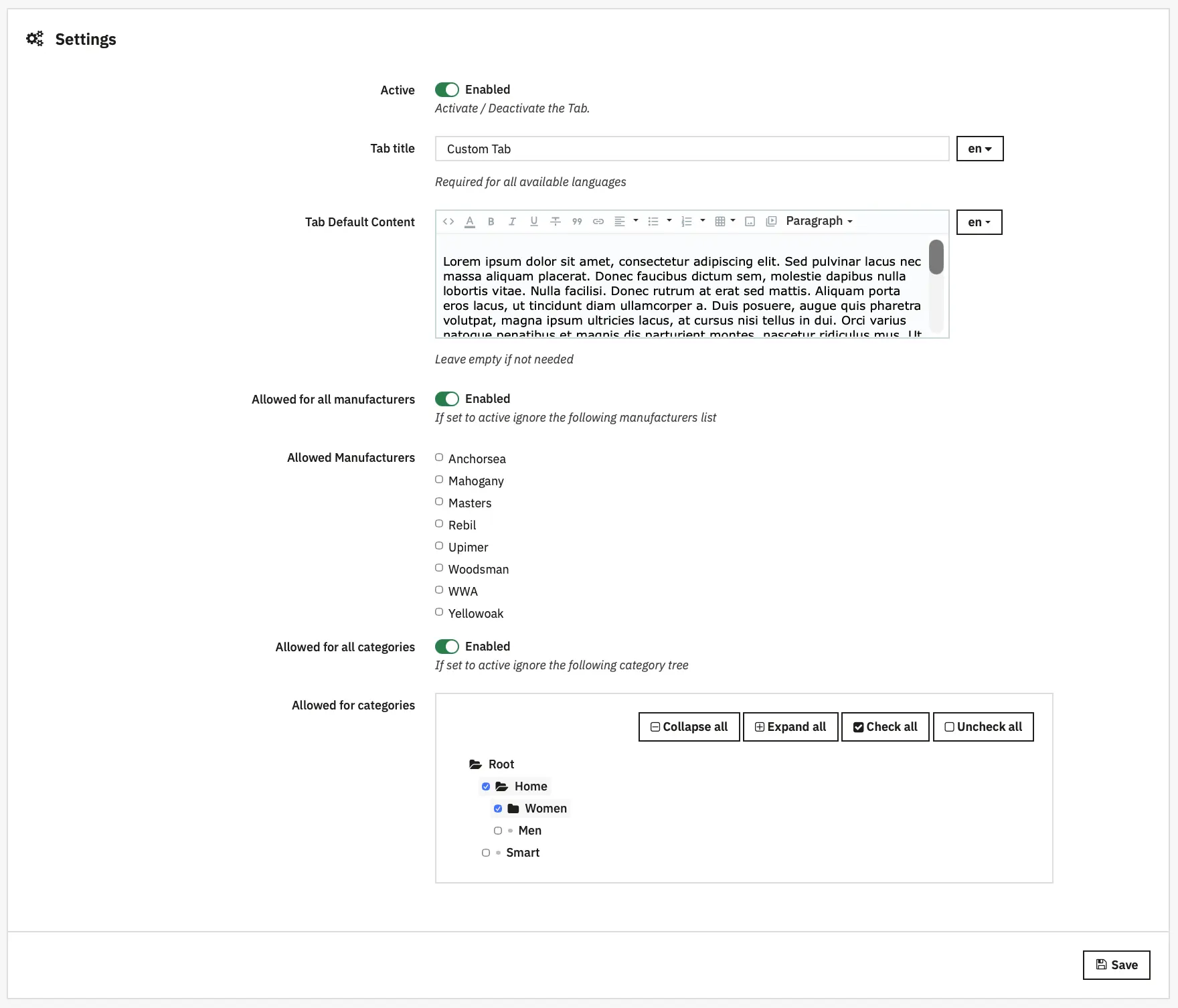
- Manage tabs under the module configuration screens.
- Each tab has:
- multilingual title
- default content (multilingual, RTE)
- status (enabled/disabled)
- allowed categories and manufacturers (or allow all)
- position (ordering)
Hooks used
displayBackOfficeHeader— loads module admin CSS/JS when configuring the module.displayAdminProductsExtra— Injects the product-level editor in Back Office product edit page. This is what allows per-product tab content editing.actionProductUpdate— Saves per-product tab contents submitted from the product edit form.displayProductExtraContent— Returns an array ofProductExtraContentinstances which are picked up by PrestaShop product page rendering.
Behaviour
- If a tab has per-product content (and is enabled) that content is shown. Otherwise, the tab's default content (from tab definition) is used.
- Tabs are filtered by shop ownership and allowed categories/manufacturers (see
CustomProductTabsModelmethods).
Notes
- Because tabs are stored per-shop, ensure you are editing the correct shop context when managing tabs in a multistore setup.