

Promokit AEO (pkaeo)
Overview
Promokit AEO (Answer Engine Optimization) makes your store easier to find and quote for AI assistants such as ChatGPT, Claude, Perplexity, Gemini and Copilot. The module:
- publishes
llms.txtandllms-full.txt, machine-readable summaries of your catalog and pages; - controls which AI crawlers may visit the store, through
robots.txt; - audits how ready your content is for AI answers (score 0–100);
- counts visits from AI crawlers and from people who arrive from an AI assistant;
- adds a store FAQ with
FAQPagestructured data.
Only public content is published: active items that are visible to guests and not restricted by customer group. Everything works per shop and per language.
Requirements: PrestaShop 9.0 or later, PHP 8.1+, Apache (the llms.txt routes are not provided for Nginx).
Installation
Install the module as usual from Modules > Module Manager > Upload a module. On install the module registers its routes and creates the tables used for traffic counters. Uninstalling removes its settings and tables, and the module block from robots.txt.
The Configure button opens the module pages in the back office: General, Bot Control, AI Audit, Traffic and FAQ.
General
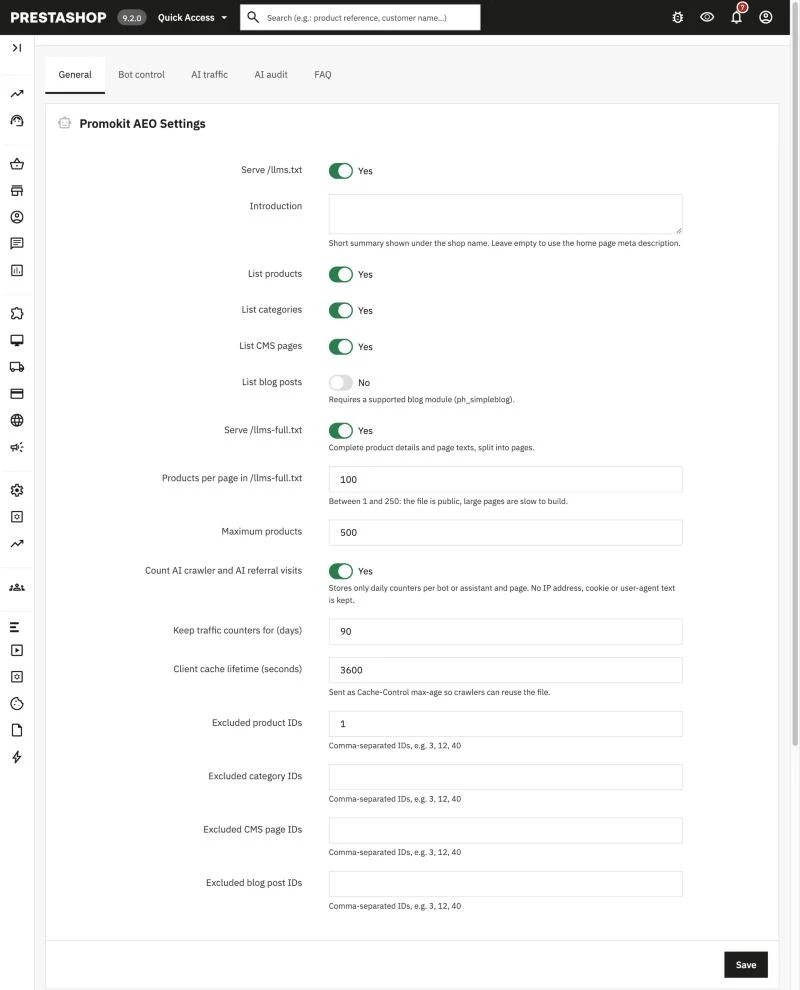
| Setting | Description |
|---|---|
| Serve /llms.txt | Turns the /llms.txt file on or off. |
| Introduction | Short description of the store shown at the top of the file. Set per language. |
| List products / categories / CMS pages / blog posts | Choose which content types are listed. Blog posts require the Blog module (ph_simpleblog). |
| Maximum products | Upper limit of products listed in llms.txt (default 500). |
| Serve /llms-full.txt | Turns the extended file on or off. |
| Products per page in /llms-full.txt | Page size of llms-full.txt (default 100). |
| Excluded product / category / CMS page / blog post IDs | Comma-separated IDs of items to leave out of both files, e.g. 3, 12, 40. |
| Client cache lifetime (seconds) | How long generated files are cached, in seconds (default 3600). |
| Count AI crawler and AI referral visits | Counts AI crawler and AI referral visits. |
| Keep traffic counters for (days) | Days the traffic data is kept (default 90). |
llms.txt
https://your-shop.com/llms.txt lists the store name, your intro text and links to products, categories and pages, each with a short description. For other languages use https://your-shop.com/{iso}/llms.txt where your URL scheme includes the language code.
llms-full.txt
https://your-shop.com/llms-full.txt contains the full content: product descriptions, price, availability and image, plus the full text of CMS pages and the FAQ on the first page. Large catalogs are split into pages; follow the link at the end of each page or use ?page=2, ?page=3 and so on.
Prices follow the customer-group setting "Show prices", so they are hidden if guests cannot see them.
Caching
Generated files are cached and served with ETag / Last-Modified headers, so crawlers receive 304 Not Modified when nothing changed. The cache is cleared automatically when you save a product, category or CMS page. Responses for signed-in customers are never publicly cached.
Bot Control
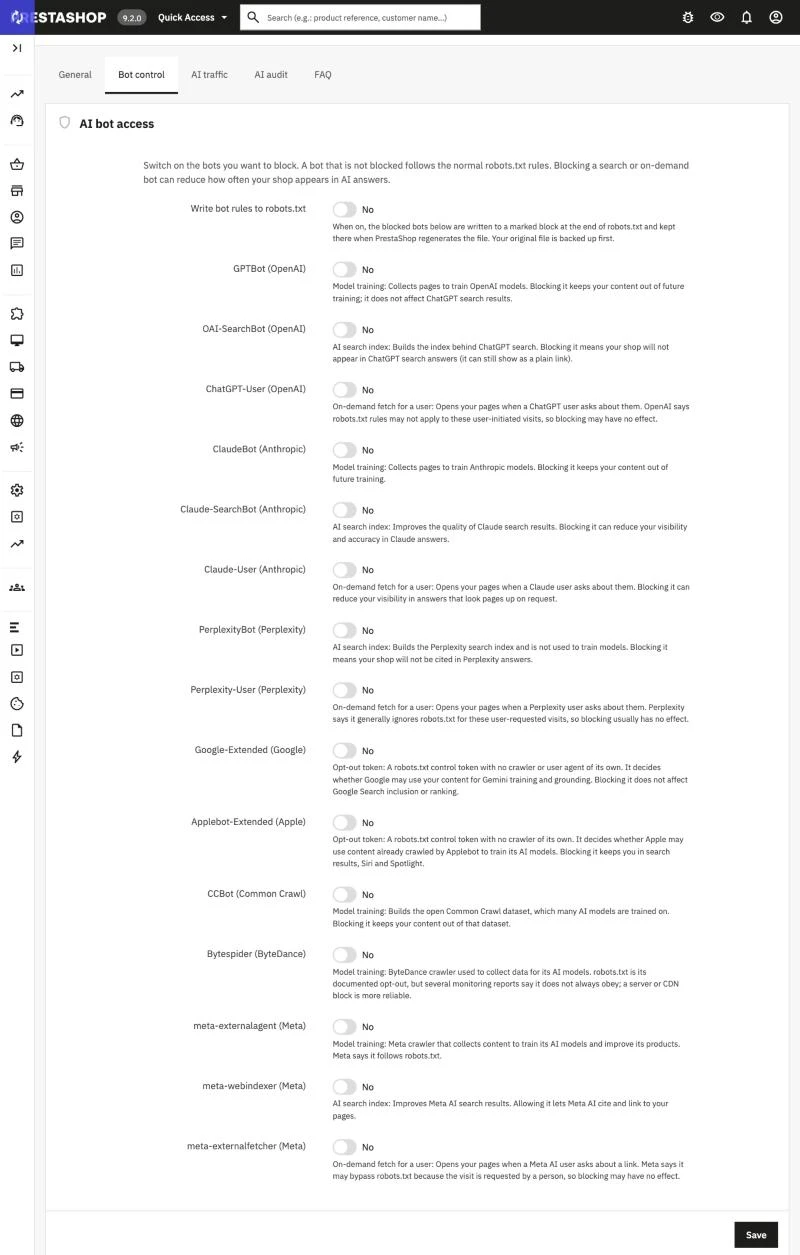
Lists known AI crawlers, grouped by purpose:
- Training — collects content to train models (GPTBot, ClaudeBot, CCBot, Bytespider, meta-externalagent).
- Search — builds an AI search index, so blocking it removes your store from those answers (OAI-SearchBot, Claude-SearchBot, PerplexityBot, meta-webindexer).
- User — fetches a page when a person asks an assistant about it (ChatGPT-User, Claude-User, Perplexity-User, meta-externalfetcher).
- Control — opt-out tokens, not real crawlers (Google-Extended, Applebot-Extended).
Each bot has a description of what happens if you block it. Select the bots to block and save.
By default the module only shows a preview of the resulting rules. Switch on Write bot rules to robots.txt to write them into your robots.txt inside a marked block:
# BEGIN pkaeo
# Managed by Promokit AEO. Edit in the module settings, not here.
User-agent: GPTBot
Disallow: /
# END pkaeoBefore the first change, a backup of your robots.txt is stored in the database. The block is restored automatically after PrestaShop regenerates robots.txt (Shop Parameters > Traffic & SEO > SEO & URLs). Edit the rules in the module, not inside the block. The file must exist and be writable.
AI Audit
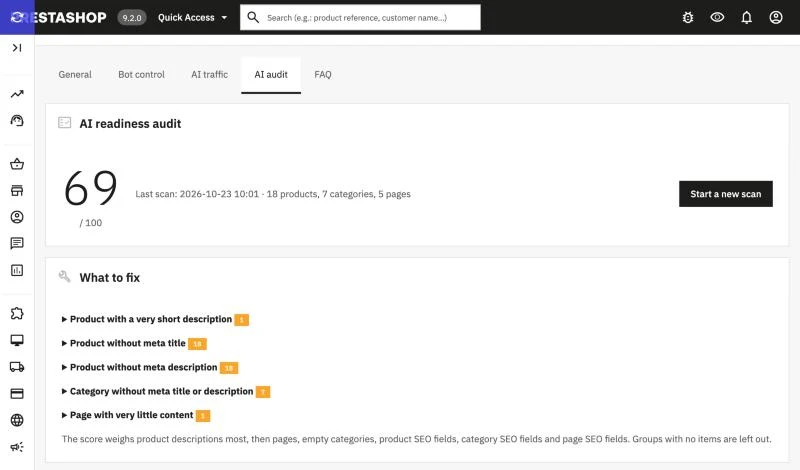
Scans your catalog in batches (never on a page load) and gives a score from 0 to 100 with a list of what to fix. The scan can be resumed if you leave the page.
| Check | Weight |
|---|---|
| Product description missing or shorter than 80 characters | 35 |
| Product without meta title or meta description | 15 |
| Category without meta title or description | 10 |
| Empty category | 15 |
| CMS page empty or shorter than 100 characters | 20 |
| CMS page without meta title or description | 5 |
The score is the weighted share of items that pass each check. Every issue in the list comes with a hint for fixing it.
Traffic
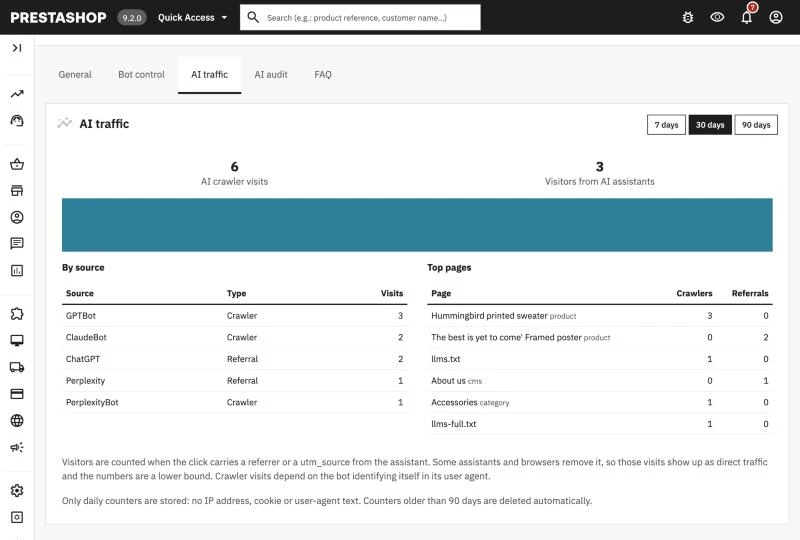
The dashboard shows two counters:
- AI crawlers — requests from known AI bots, by bot and by page.
- AI referrals — visitors who came from ChatGPT, Perplexity, Gemini, Claude, Copilot or DeepSeek. They are recognised by the referring site or by the
utm_sourceparameter.
Visitors' IP addresses are not stored in raw form (only a hash), data older than the retention period is deleted automatically, and referral counting is skipped when cookie consent is required and not given.
FAQ
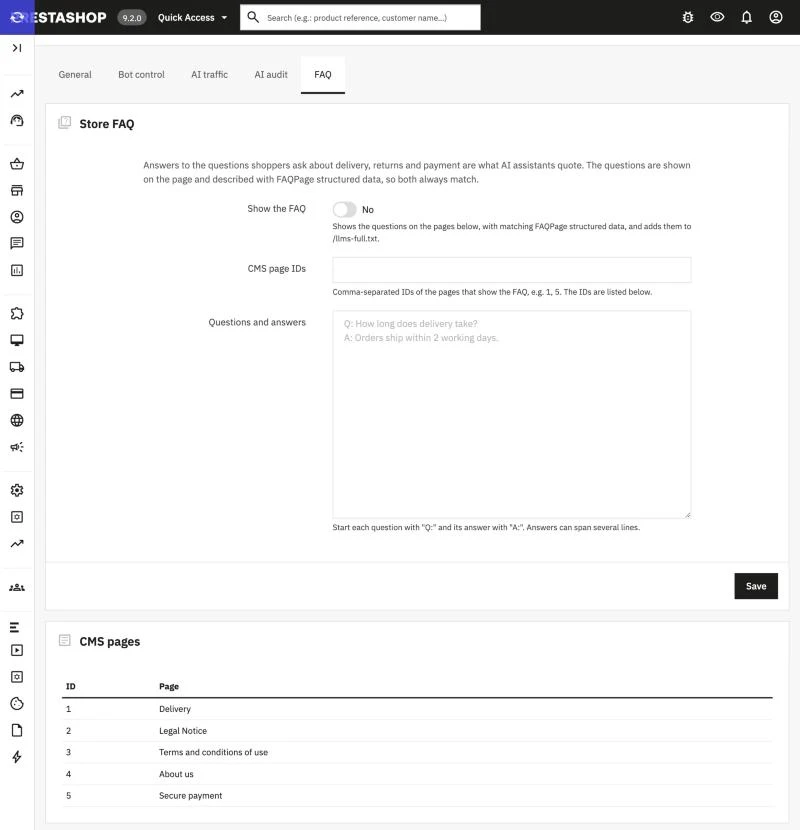
Add questions and answers in this format:
Q: How long does delivery take?
A: Orders ship within 24 hours and arrive in 2-4 business days.
Q: Can I return a product?
A: Yes, within 14 days of delivery.A line starting with Q: opens a question and a line starting with A: its answer; following lines continue the current part. Questions without an answer are ignored.
Switch on Show the FAQ and enter the IDs of the CMS pages where it should appear (the page IDs are listed below the form). The module adds FAQPage structured data to those pages and includes the FAQ in llms-full.txt. FAQ text is set per language.
Used Hooks
moduleRoutes— registers/llms.txtand/llms-full.txt.actionFrontControllerInitAfter— counts AI crawler and AI referral visits.actionAdminMetaAfterWriteRobotsFile— re-applies the bot rules afterrobots.txtis regenerated.displayCMSDisputeInformation— displays the FAQ on the selected CMS pages.
Troubleshooting
/llms.txtreturns 404 — make sure the module is enabled andllms.txtis turned on in General. Clear the cache in Advanced Parameters > Performance and check that your server passes.txtrequests to PrestaShop.- Changes in robots.txt are missing — switch on Write bot rules to robots.txt and check that the file exists and is writable.
- No traffic data — tracking must be enabled, and a full-page cache in front of the shop can hide requests from the store.